Autofill: Apply in Clicks
Autofill forms faster with your profile and AI-powered answers.
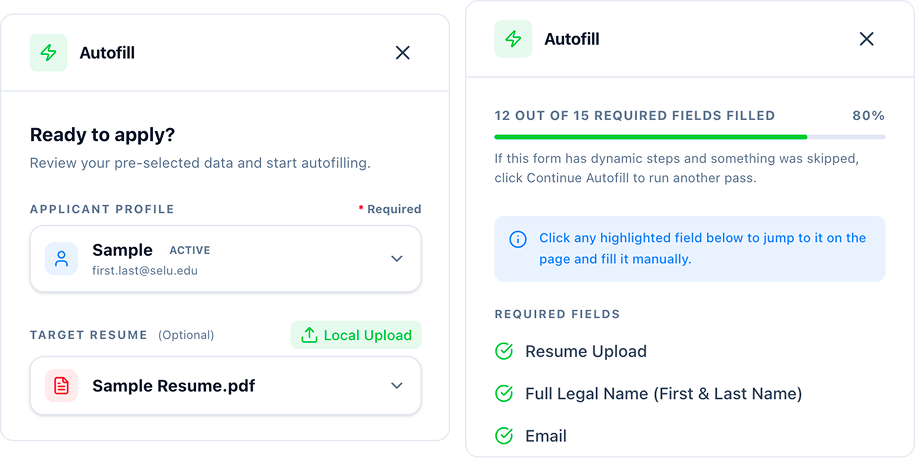
What Autofill does for you
Stop retyping your resume
Use your saved profile and resume for work history, education, links, and other repeated fields.
Get help with ATS questions
Draft answers for application questions based on your resume, profile, and the role.
Stay in control
Review every field before submitting. FrogHire fills the form; you send it.
Autofill for Workday, Greenhouse, Lever, and more
FrogHire runs through the browser extension while you are on an application page. It helps with the fields job seekers usually have to re-enter by hand: work history, education, contact details, links, and basic screening questions.
For multi-step applications such as Workday, Autofill can continue as you move through the form. It can also draft short answers from your profile, resume, and the role, so you are not starting from a blank field.
Private local reuse
When you edit an answer on an application page, FrogHire can save that edit in your browser for similar fields later. These application-page edits stay local and are not uploaded to the cloud.

Greenhouse
Workday
Lever

Ashby

Oracle Cloud

UltiPro
Jobvite

BambooHR
iCIMS
ADP
Dayforce HCM

JazzHR

Rippling

Workable

BreezyHR

Recruitee

Avature
FAQ
Questions about Autofill
Can FrogHire.ai autofill Workday job applications?
FrogHire.ai can help with repeated fields on Workday applications, including multi-step forms that continue across several pages. You should still review each field before submitting.
Does FrogHire.ai Autofill work with Greenhouse, Lever, and other ATS platforms?
FrogHire.ai supports common application systems such as Greenhouse, Lever, Ashby, iCIMS, ADP, Dayforce HCM, Jobvite, BambooHR, and more. It is built for real job application pages, not just browser-saved contact fields.
Can FrogHire.ai answer job application questions?
Autofill can draft short answers for screening or application questions based on your profile, resume, and the role. You can edit the answer before you send the application.
Does FrogHire.ai submit applications automatically?
FrogHire.ai fills fields and drafts answers, but you review the application and decide when to submit it.
Are my edited application answers uploaded to the cloud?
If you edit an answer on an application page, FrogHire.ai can save that edit locally in your browser for similar fields later. Those application-page edits stay local and are not uploaded to the cloud.
Keep Exploring
Related Resources
Continue with focused help pages, practical tools, and deeper blog reads.
Explore Help
3Learn Guides
1From Blog
4- Best Chrome Extension for Remote Job Applications
Remote job applications need more than faster form fill. FrogHire.ai helps check company context, tailor resumes, autofill ATS forms with review, and track follow-ups in one workflow.
- Job Application Autofill: How to Fill Forms Faster Without Losing Control
A practical guide to job application autofill, including repeated fields, screening questions, Workday pages, remembered corrections, and the review step before submission.
- Best Job Application Autofill Tool: Review Custom Questions Before You Submit
The best job application autofill tool should fill repeated fields without guessing sensitive answers. Learn how to review custom questions, work authorization, sponsorship, salary, location, and final certification before submitting.
- Free Job Application Autofill Extension: What You Can Actually Do Without Paying
A free job application autofill extension should work on real applications, not only demo fields. FrogHire.ai gives free users daily autofill access, with unlimited autofill available for subscribers.